
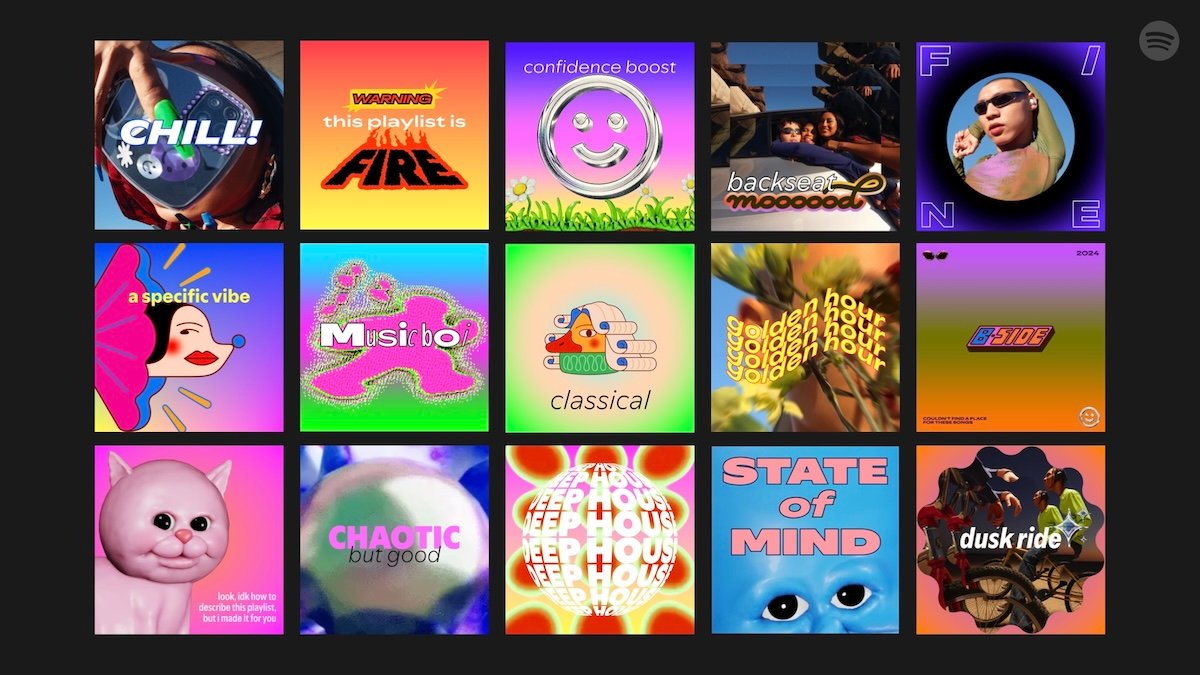
Spotify is one of the most popular music streaming platforms in the world. Millions of people use it to discover new music, create playlists, and share their favorite songs. One feature that helps make playlists unique and visually appealing is Spotify playlist covers. A great playlist cover can grab attention, reflect the mood of your music, and make your playlist more shareable. In this article, we will explore everything about Spotify playlist covers, including how to make them, tips for design, and common questions.
What Are Spotify Playlist Covers
Spotify playlist covers are the images that appear at the top of your playlist. They act like the front cover of a music album. When someone sees your playlist, the cover is the first thing they notice. A good playlist cover can give your playlist personality and attract more listeners. Spotify allows users to upload custom covers or choose from automatically generated images from songs in the playlist.
Why Spotify Playlist Covers Are Important
Playlist covers are important because they create a first impression. If you want people to click on your playlist and listen to your songs, the cover should match the vibe of your music. A calm, relaxing playlist might use soft colors and serene images. A workout playlist might use bold colors and energetic pictures. By using attractive playlist covers, you can make your playlist more professional and engaging.
How to Change Spotify Playlist Covers
Changing your Spotify playlist cover is simple. First, open your playlist on Spotify. Then click on the current cover image or the “…” menu. Select the “Edit Playlist” option. From there, you can upload a new image from your device. Spotify recommends using images that are at least 300 x 300 pixels for the best quality. Once you upload the image, it will appear as your new playlist cover.
Tips for Creating Custom Playlist Covers
Creating custom Spotify playlist covers can be fun and creative. Use bright colors that match the mood of your playlist. Choose images that are clear and not too cluttered. Avoid using copyrighted images unless you have permission. You can also add text to your cover to show the name of the playlist. Many free online tools, like Canva, allow you to design custom playlist covers easily.
Popular Styles for Spotify Playlist Covers
Spotify playlist covers can be made in many styles. Some people prefer minimalist designs with simple shapes and colors. Others like photo-based covers featuring landscapes, people, or objects. Collages and digital art are also popular. Whatever style you choose, make sure it reflects the theme and mood of your playlist. Consistency in style can also help your playlists look more professional if you have multiple playlists.
Best Dimensions for Spotify Playlist Covers
The recommended size for Spotify playlist covers is 300 x 300 pixels. This ensures that your image looks good on all devices, from smartphones to desktop computers. Square images work best because Spotify displays covers in a square format. Make sure your images are clear and not pixelated, as blurry images can look unprofessional.
Using Canva for Spotify Playlist Covers
Canva is a popular tool for designing Spotify playlist covers. It offers free templates, easy-to-use tools, and a wide range of design elements. You can create a playlist cover by selecting a template, adding your image or background, inserting text, and adjusting colors. Canva also allows you to download your cover in high quality, ready to upload to Spotify.
Free Image Sources for Spotify Playlist Covers
Finding the right images is crucial for creating a good playlist cover. Free image websites like Unsplash, Pexels, and Pixabay offer high-quality images that you can use legally. Make sure to choose images that match the mood of your playlist. Avoid using low-resolution images, as they can appear blurry when uploaded.
Adding Text to Your Playlist Covers
Adding text to your Spotify playlist cover can help communicate the theme of your playlist. Keep the text short and readable. Use large fonts and contrasting colors to make the text stand out. You can include the name of your playlist, a short tagline, or even a fun quote. Just remember not to overcrowd the cover with too much text.
Matching Playlist Covers with Playlist Themes
It’s important to match your playlist cover with the songs inside. For example, a summer party playlist could have bright, sunny colors and fun images. A relaxing playlist for sleep could use soft, calming colors. Matching the cover to the theme of your playlist helps listeners understand the mood and purpose of your playlist at a glance.
How Playlist Covers Affect Engagement
Studies show that attractive playlist covers can increase engagement. People are more likely to click on a playlist with a professional and visually appealing cover. Covers also make playlists more shareable on social media platforms. If your playlist is eye-catching, it can attract more followers and listeners, which helps you reach a wider audience.
Common Mistakes to Avoid in Spotify Playlist Covers
Some common mistakes include using low-quality images, cluttered designs, or text that is hard to read. Avoid using copyrighted images without permission. Another mistake is not matching the cover with the playlist theme. A cover that does not reflect the music can confuse listeners and reduce engagement. Keep your cover simple, clear, and relevant.
Frequently Asked Questions About Spotify Playlist Covers
Can I use copyrighted images for my playlist cover?
No, you should avoid copyrighted images unless you have permission from the owner. Use free image sources or create your own designs to stay safe.
What is the best size for a Spotify playlist cover?
The recommended size is 300 x 300 pixels. This ensures your cover looks clear on all devices.
Can I add text to my Spotify playlist cover?
Yes, you can add text to describe your playlist. Keep it short, readable, and visually appealing.
Do Spotify playlist covers affect playlist engagement?
Yes, an attractive and relevant cover can increase clicks, followers, and shares. People are more likely to listen to visually appealing playlists.
Can I change my playlist cover anytime?
Yes, Spotify allows you to edit and change your playlist cover at any time. You can update it as often as you like.
Are there free tools to make playlist covers?
Yes, Canva is a popular free tool. Other options include Adobe Express, Fotor, and online photo editors.
Do playlist covers show up on social media?
Yes, when you share your playlist, the cover appears alongside the link. A good cover can make your playlist more shareable.
Conclusion
Spotify playlist covers are an essential part of creating and sharing playlists. They help your playlist stand out, reflect its mood, and attract more listeners. By creating custom covers, using the right images, adding readable text, and matching the theme of your playlist, you can make your playlists more professional and engaging. Whether you are creating a playlist for personal use or sharing it with the world, investing time in your playlist cover is a step toward success.